Tag Archives: intune

Intune Default Device Compliance Policy fails “Enrolled user exists”

Some devices were failing the Intune “Default Device Compliance Policy”.  This in turn was preventing access to 365 resources due to a Conditional Access policy requiring a compliant device.  The policy was failing with “Enrolled user exists”


The non complaint policy showed a logged in user as an account that was disabled.

Logging on as the normal user, navigating to: https://portal.manage.microsoft.com/ and selecting the device, performing a sync from the intune portal and then waiting 30 minutes or so the device was now showing compliant.

References:

https://www.reddit.com/r/Intune/comments/gntqmk/noncompliant_devices_enrolled_user_exists/
Delete a device from intune

Assume the device is no longer contactable

Grab the Entra Device ID of the device

Navigate to https://security.microsoft.com/interoperability/api-explorer

Change to a Post, paste in https://api.securitycenter.microsoft.com/api/machines/$EntraDeviceID/offboard

Add a comment in the field such as

{"Comment":"Offboard machine by anonit job number 1234"}

And run the query

Deploy uBOL via Intune (Edge and Chrome)

Chome:

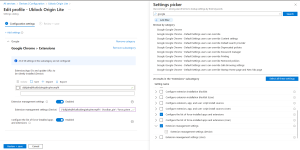
Intune -> Configuration Policy -> Win 10 and Later -> Settings Catalog -> Add -> Google Chrome Extensions -> Configure the list of force-installed apps and extensions AND Extension Management Settings

Add the uBOL extension ID to be installed, and set the Extension management Settings for pinning – {"ddkjiahejlhfcafbddmgiahcphecmpfh": {"toolbar_pin": "force_pinned"}}

Screenshot of Intune settings showing the Google Extension settings required


Edge:

Intune -> Configuration Policy -> Win 10 and Later -> Template -> Administrative Templates ->  Microsoft Edge -> Computer Configuration -> Extensions Control which extensions are installed silently AND Configure Extension Management Settings

Add the uBOL extension ID to be installed, and set the Extension management Settings for pinning – {"cimighlppcgcoapaliogpjjdehbnofhn": {"toolbar_pin": "force_pinned"}}


For both, deploy the script for exclusions and disable the first run.  See https://pastebin.com/2GCJ4YpF for the script.

Autodesk 2022 DWG Trueview via Intune

I was trying to deploy Autodesk DWG Trueview 2022 via Intune and failing.  All the details I could find pointed to using switches /W /Q /I for unattended install.

That was failing, but found that setup.exe -q worked.

The uninstall of MsiExec.exe /x {28B89EEF-4128-0409-0100-CF3F3A09B77D} /qn still looks to work ok.


references:

https://knowledge.autodesk.com/support/dwg-trueview/troubleshooting/caas/sfdcarticles/sfdcarticles/How-to-install-DWG-Trueview-silently-enforcing-a-restart.html

https://forums.autodesk.com/t5/installation-licensing/silent-install-assistance-for-dwg-2022/td-p/10190457

https://silentinstallhq.com/autodesk-dwg-trueview-2021-silent-install-how-to-guide/